November's improvements and fixes
In November we made loading IFC models faster and made Speckle better for design reviews with the release of Markups. But we also found time for a good list of other improvements across web and integrations.
Web
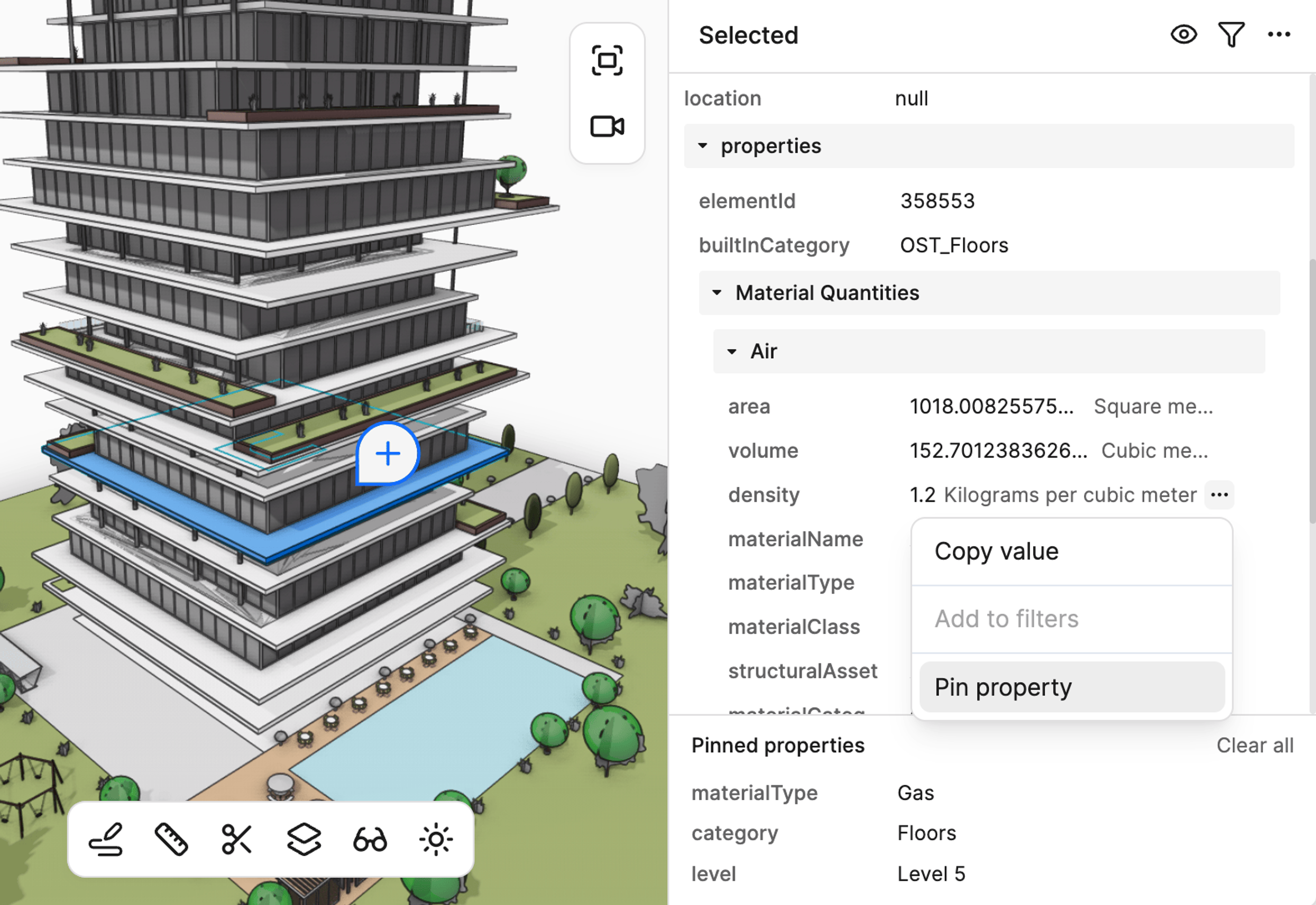
Pinned properties in the web viewer
You can now pin properties in the web viewer’s selection info panel to make it easier to compare values when selecting objects. Pinned properties persist across viewer sessions and projects, until you clear them.
We also now keep the groups in the selection info panel expanded when you select a new object – further contributing to a better experience!
Integrations
Navisworks Performance Boost
The Navisworks connector now uses geometry instancing to dramatically reduce file sizes and improve loading times. When your model contains repeated components—hundreds of identical beams, windows, or mechanical equipment—Speckle now stores the geometry once and creates lightweight references for duplicates.
The result: Faster uploads, quicker downloads, and smoother viewer performance for large models. This is especially impactful for projects with extensive repetition, where file sizes can shrink significantly.
Model-Wide Properties in Grasshopper
Grasshopper workflows now support properties at the model level, not just individual objects. This means you can attach project-wide metadata—design parameters, performance targets, project information—directly to your root collection.
Better Unit Handling for Imported Files
We've improved unit detection and scaling accuracy across various file formats. This ensures your imported geometry maintains correct proportions regardless of source file type.
DGN, SKP, STP, and FBX files now preserve their native units automatically, so your geometry appears at the correct scale from the moment you import it.
Additional Improvements
Autodesk Construction Cloud
- Removed View Dependency on Element Extraction: Views are now optional when extracting models. Without a defined view, all model elements are extracted from the Revit file automatically.
- Instance Proxies for Family Instances: Similar to Navisworks, repeated family instances now use geometry instancing for improved performance. This results in faster uploads, quicker downloads, and smoother viewer performance.
- Improved Surface Rendering: Shared vertices for smooth surfaces provide cleaner, higher-quality geometry visualization.
- Room ID and Phase Properties: Family instance elements now include
roomIdparameters for spatial analysis. Phasing data is now correctly preserved during model extraction.
Revit
- Room and Space Tracking: Family instances now include
roomId,toRoomId,fromRoomIdandspaceIdparameters, enabling spatial analysis in dashboards and PowerBI reports. - Saved Views Publishing: Publish 3D perspective views directly to Speckle.
- Railing Material Handling: Fixed duplicate elements and material errors when railings have different TopRail materials.
- Family Instance Curves: Curves in family instances now render in correct positions instead of at the origin.
Rhino
- Material Persistence: Materials are now reused when receiving model updates, preserving any manual edits you've made to material properties across versions.
- Saved Views Publishing: Named perspective views now publish to Speckle.
- Stability Fix: Resolved crashes that occurred when no active document was available.
Grasshopper
- Reliable Data Objects: Fixed issue where objects would disappear during publish-load workflows.
- UI Responsiveness: Component interfaces now properly update when toggling property modes.
Power BI
- Independent Authentication Flow: The connector now authenticates directly with Speckle servers without requiring the Speckle Desktop service. This is enabled through a new Model Info input that handles authentication and data exchange. The Version Object ID input remains available for backwards compatibility, ensuring your existing Power BI reports continue working.
Navisworks
- Property Accuracy: Quantity extraction now uses proper unit conversions matching the Navisworks UI.
ETABS
- Volume Calculations: Frame and shell elements now include volume data, enabling volume-based filtering and quantity analysis with minimal performance impact.