View, share and compare models
View any BIM model, of any size, in your browser
Connect teams to live, version-controlled model data across any CDE or design authoring tool, with full visibility into changes and their downstream impact. No authoring tool license, install or BIM training needed.
One model, every stakeholder
See what changed, share what matters
Intuitive, browser-based viewing for every stakeholder on your project. See version-controlled model data across Revit, Rhino, Tekla, Civil 3D, IFC files, and more.
Every change, captured and accounted for.
- Elements added, removed
- Material or quantity changes
- Changes between design stages
- Who changed what, and when
01 / 03
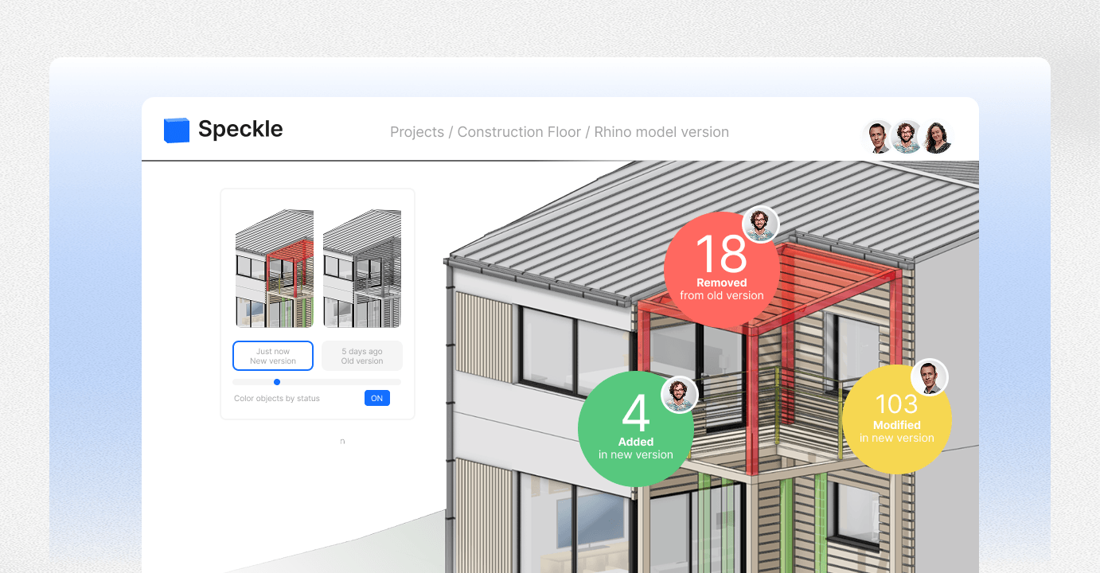
Compare two versions and see exactly what changed
Compare versions side by side, trace a change back to the decision that made it, and see what shifted between design stages down to the individual object.
 Floors, core and partitions+4,150 objects
 Pipework and ductwork routed+2,991 objects
 Curtain wall framing+6,950 objects
 Glazing, cladding and balconies+3,440 objects
02 / 03
Faster project coordination
Move data between your preferred CDE and design authoring tools without exports.
- Architect· Publishes from the authoring tool straight into the shared model.
- Engineer· Coordinates the services model against it, without exports.
- Client· Reviews the latest version in the browser, no license or install.
- Asset owner· Gets the whole record, every version, at handover.
03 / 03
A best-in-class viewer, right in the browser
Contractors, cost managers, clients, and owners can open and explore Revit, IFC, or Rhino models without ever opening the authoring tool.
- Built on WebGPU· Geometry streams straight to the graphics card, so multi-gigabyte federations stay smooth on a laptop and reopen instantly from browser storage.
- Right in the browser· Nothing to install, no license, no plugin. A link opens the full model on any machine, and every object still carries its properties.












Speckle Intelligence
Ask the model what changed.
Speckle Intelligence reads your published versions and answers in plain language: what was added, what moved, who changed it and when, with every number traceable to the query that produced it.
Try a question
Speckle Intelligence
Getting data in
Ways to unlock your data with Speckle
Connect your authoring tools
Install a connector to publish data to Speckle or exchange it with other tools as you work.
Connect your data sources
Automatically sync project data from cloud platforms and business systems.
Upload model files
Instantly explore, share, and analyze project data from uploaded files like RVT or IFC, even without access to the original software.
Outcomes
Industry teams consistently report
- 5–10 hoursof rework eliminated per team, every week
- 35%more time spent on high-impact work
- 60% fewermanual data entries
- 9 days to 12 minreduction in model delivery time
Modelers reduced their delivery time from 9 days to 12 minutes thanks to Speckle.

Benedetta Ravicchio
Senior Computational Designer

Speckle is key for getting messy and complicated BIM data into our data lake in a way we can use.

Murat Melek
Senior Director

The data stays accurate automatically, fits seamlessly into our workflow, and keeps insights up to date without adding any extra work for our BIM teams.

Gabriel Sévigny
BIM Manager

Limitless integration & access
One data layer across ecosystems
Autodesk, Rhino, Grasshopper, Tekla, Civil 3D, Navisworks, IFC, and ProjectWise data flows into a shared, versioned layer through file uploads, plugins or continuous syncs.
Conditioned design data pipeline for enterprise data lakes
Connect data across every system your team relies on
Connect structured model data to Power BI, Databricks, Microsoft Fabric, Snowflake, cost systems, procurement platforms, and operational databases.
Destinations
- Power BI
- Databricks
- Microsoft Fabric
- Snowflake
- Cost systems
- Procurement platforms
- Operational databases